
.avif)





%201.svg)

.png)
Oracle Cloud Infrastructure identity security begins as a visibility problem. An OCI tenancy holds human users, AI agents, and non-human identities such as API keys, auth tokens, and customer secret keys, and the OCI console shows them to you one profile at a time. Unosecur connects to an OCI tenancy using a read-only API key and inventories it all in a single view, so you can identify over-permissioned access and reduce it to least privilege.
This blog covers what identities exist in an OCI tenancy, what Unosecur discovers once connected, how to connect it, and what to do in the first week.
What identities exist in an OCI tenancy?
An OCI tenancy contains three populations of identity: human users, non-human identities, and AI agents.
The human layer is the one teams know how to enumerate. Users belong to identity domains, sit in groups, and hold roles. You can list them.
The non-human layer is larger and harder to see, because it grows one profile at a time. Every engineer who has needed an API call to work has generated an API key from their own OCI profile. The same is true of auth tokens, customer secret keys, OAuth client credentials, and OCI apps. Open your own Tokens and keys tab, and you will likely find more entries than you remember creating. Now multiply that by the size of your team. None of these appear in an access review built around people, because none of them are people. They authenticate, they hold permissions, and nobody offboards them.
The third population is newer. AI agents operating inside a tenancy hold access the same way a person does, but they do not log in, do not have a manager, and do not appear on anybody's checklist. They also accumulate faster than either of the other two.
Why the OCI console cannot give you an access review
The OCI console is an administration tool, not a review tool, and the difference matters. It is designed to show you one object clearly: a user, their groups, their keys, their tokens. An access review needs the inverse. It needs every user at once, so you can ask which hold admin privileges and which have never enabled MFA. It needs every credential at once, so you can ask which have gone unused. It needs every policy at once, so you can ask which grants more access than anyone intended.
The console will answer each of those questions. It will only answer one profile at a time, and in a tenancy of any size, the beginning of the list will have changed by the time you reach the end. This is why OCI tends to be the cloud in a multi-cloud estate that has rarely been through a full access review. The aggregate view has to come from somewhere else.
What Unosecur discovers in an OCI tenancy Unosecur inventories four layers of an OCI tenancy: human identities, AI agents, non-human identities, and the access layer that connects them to resources.
Human identities: Users, in one list rather than one profile at a time.
AI agents: The AI agents operating inside your tenancy discovered and inventoried alongside human and non-human identities, with the access context and the path to least privilege.
Non-human identities: API keys, auth tokens, customer secret keys, OAuth client credentials, and OCI apps. These are the credentials that authenticate without a person behind them, and they are where most uninventoried access lives.
Access and resources: Policies, roles, groups, identity domains and compartments, and the cloud resources those policies apply to, including volumes and storage. This layer is what turns an identity list into a risk picture, because an over-permissioned account only matters in proportion to what it can touch.
OCI identity insights: admin status, MFA status, and account status
Unosecur surfaces three identity insights on every OCI user: whether the account holds admin privileges, whether MFA is enabled, and whether the account is still active or partially offboarded.
Individually, none of those is hard to find. You can check any one of them for any one user in the console. What changes is reading them across the entire population at once, because that is when outliers stop hiding inside a long list. An admin account with no MFA is obvious the moment you can see every account together, and effectively invisible when you cannot.
These are surfaced as insights. They give your team the context to judge which accounts warrant attention rather than handing down a verdict. How to connect Oracle Cloud Infrastructure to Unosecur
Connecting OCI to Unosecur takes five values from the OCI console and a read-only API key. Nothing is installed in your tenancy.
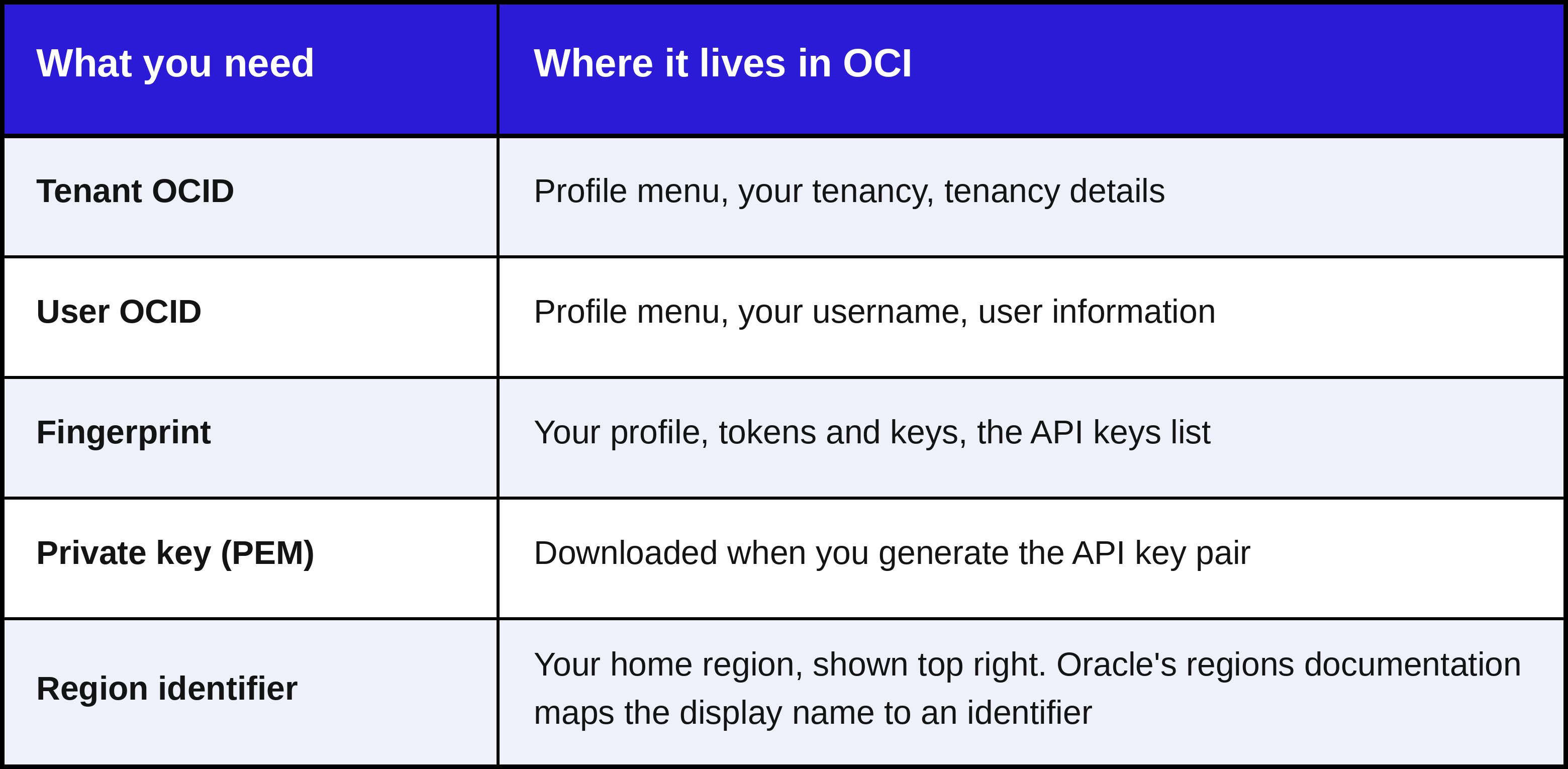
In the OCI console
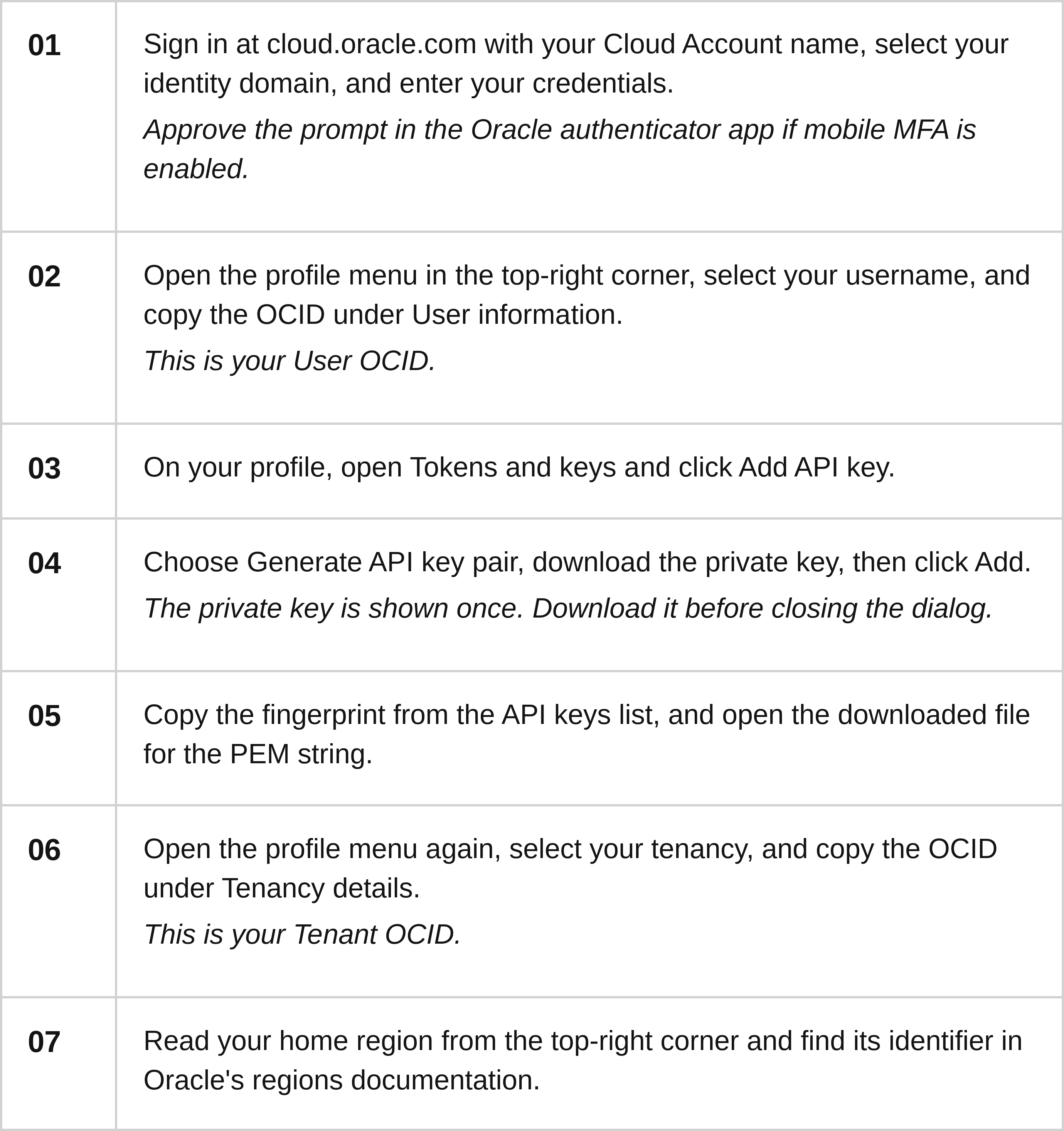
In Unosecur
Go to Settings, then Integrations, and select Oracle Cloud under Cloud Accounts. Enter the Tenant OCID, User OCID, fingerprint, and region, then click Next. Paste the PEM key and click Next again. Unosecur validates the credentials and confirms when the integration is complete.
Treat the private key as you would any other signing key. Store it in your secrets manager rather than a folder on a laptop, and restrict the file permissions. If it is ever exposed, delete the API key in OCI and generate a new pair. Deleting the key revokes access immediately, which is worth knowing in its own right: the off switch is on your side.
One last thing worth noticing. The API key you just created to connect Unosecur is itself a non-human identity, and it will appear in the inventory alongside every other credential in the tenancy. Which is exactly where it belongs. Anything that can authenticate to your cloud deserves to be on the list, whether an engineer added it in a hurry or a security team added it while doing the right thing.
What to do in your first week with OCI connected
Start with the accounts that warrant attention, then work down to the access nobody is using. The inventory is the starting point, not the outcome.
- Identify risky accounts, resources, and permissions. This gives you a shortlist to run an access review from, instead of the full user list.
- Find the policies granting broad access. In most tenancies, these were written once to unblock somebody and never revisited.
- Remediate those policies. Act on them from inside Unosecur rather than going back to the console.
- Identify unused privileges. Entitlements nobody has exercised are the cheapest access to remove, because nothing breaks when they go.
- Repeat next month. This is the only version of least privilege that survives a real environment. Standing access occurs between audits rather than during them.
One access review, every cloud
A multi-cloud estate only has one access posture, not four. The moment OCI sits in the same inventory as AWS, Azure, and Google Cloud, the question stops being "which cloud have we reviewed" and becomes "which identities across all of them hold access they do not need." That is a much better question, and it is the only one a CISO can answer honestly.
Connecting a tenancy takes five values and a read-only API key. Book a demo and see what your OCI estate has been holding.




%201.svg)



.webp)

.avif)